Payment Processors for Small Business: How to Choose
Compare fees, features, security, and top payment tools for small firms.

Understanding Payment Processing for Small Businesses
Payment processors for small business let customers pay by card, bank transfer, or mobile wallet. The best choice depends on how you sell, your sales volume, and your need for control.
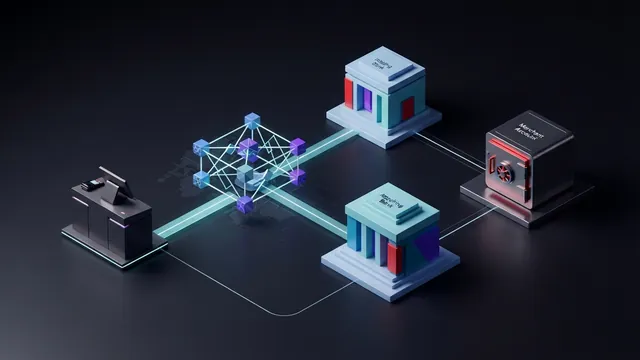
Every card payment follows three main steps. First, the customer starts the payment at checkout. Next, the processor seeks approval from the card network and the customer’s bank. Finally, the payment settles into your business bank account.
Settlement may take one to three business days. The exact time depends on the provider, payment type, and account history. A processor may also hold funds when a payment looks risky.
- Initiation: A customer enters card details or taps a card.
- Authorization: The bank checks the account and approves or rejects the payment.
- Settlement: Funds move through the network and reach your bank.
For example, a $50 card sale may show as approved within seconds. The money may reach your bank later, after fees are removed.
Two Main Types of Payment Processors
Most small firms choose between a merchant account provider and a payment service provider. Both move funds, but they handle accounts and risk in different ways.
Merchant account providers
A merchant account provider gives your business a dedicated account for card payments. It often offers custom rates, detailed controls, and support for larger sales volumes.
This route can suit firms with steady sales and lower risk. It may involve an application, underwriting, monthly fees, or a contract. Setup can take longer than with a simple app-based service.
Payment service providers
A payment service provider, or PSP, groups many sellers under one payment system. Square and Stripe are well-known examples. They usually offer fast signup, clear tools, and no separate merchant account.
PSPs work well for new firms, shops, and online sellers. They can still freeze funds or close accounts after risk checks. Read the terms before you rely on one provider for all sales.
A payment gateway is the secure bridge for online payments. It sends payment details for approval without exposing the full card number to your store. Many PSPs include a gateway, while other providers let you choose one.

Features That Matter in a Payment Solution
Start with the payment types your customers use now. Add the types you may need within the next year. A local shop may need tap payments, while a service firm may need invoices and saved cards.
Security should rank high on your list. Look for token storage, fraud checks, clear chargeback tools, and support for PCI compliance. The PCI Security Standards Council’s PCI DSS standard explains the rules for protecting card data.
| Feature | Why it helps |
|---|---|
| In-person payments | Supports chip, tap, swipe, and mobile wallets |
| Online gateway | Secures card payments on a website |
| Invoicing | Lets you request payment by email or link |
| Fraud tools | Flags unusual orders before shipment |
| Reports | Shows sales, fees, refunds, and payouts |
| System links | Connects payments with books, stock, and orders |
Integration matters as much as the payment rate. A processor should work with your website, point-of-sale system, accounting tool, and stock system. Good links cut manual entry and reduce mistakes.
Check whether the provider offers an application programming interface, or API. An API lets a developer connect payments to a custom site or app. You may not need one today, but it can matter as your business grows.

How to Choose the Right Payment Processor
Compare the full cost, not just the headline card rate. A provider may charge a per-payment fee, monthly fee, device fee, payout fee, or chargeback fee. Ask for a sample bill based on your real sales.
Suppose you take 200 payments each month. A 2.9% fee plus $0.30 costs about $350 on $12,000 in sales. A lower rate with a monthly plan may save money at that volume.
Use this checklist before you sign up:
- List your average payment size and monthly sales.
- Note every payment type you accept or plan to accept.
- Check hardware prices and replacement terms.
- Review payout times and reserve rules.
- Test links with your website and accounting tools.
- Read terms for refunds, disputes, and account closure.
- Ask how support works outside normal business hours.
Scalability matters when sales rise. Look for higher limits, more users, new locations, and multi-currency support if needed. A low-cost tool may become costly when you add staff or locations.
Support can save more money than a small rate cut. Check phone hours, response times, setup help, and access to a real support team. Slow help can delay refunds and block sales during a busy period.

Common Payment Processing Challenges
Transaction fees are the most visible cost. They can also include network fees, refunds, hardware, and monthly charges. Track fees each month so you can spot changes early.
Fraud creates a second risk. Stolen cards can lead to lost goods, fees, and chargebacks. A chargeback happens when a customer asks their bank to reverse a payment.
Use basic controls before adding complex tools:
- Require a billing address for high-risk orders.
- Set review rules for large or unusual purchases.
- Ship only after payment approval.
- Keep delivery proof and customer messages.
- Answer disputes before the stated deadline.
Rules for card data can also cause stress. Keep sensitive card details out of your own systems when possible. Choose hosted payment pages or token tools that lower your data burden.
Funds may also face a temporary hold. This can happen after a sudden sales jump, many refunds, or unusual orders. Keep a cash buffer so a payout delay does not stop payroll or stock orders.

Popular Payment Processors for Small Businesses
There is no single best payment processor for every firm. The right match depends on sales channels, average order value, and control needs. Use this short payment processors list as a starting point.
| Provider | Often suits | Key strength |
|---|---|---|
| Square | Retail, food, and mobile sellers | Simple in-person sales tools |
| Stripe | Online stores and software firms | Flexible website and billing tools |
| PayPal | Online sellers and marketplaces | Familiar wallet checkout |
| Shopify Payments | Shopify store owners | Payments tied to store tools |
Square is often a strong fit for in-person sales. Its reader and register tools can suit a shop, market stall, or small service team. It also supports invoices and online sales.
Stripe is often a strong fit for online sales. It supports hosted checkout, subscriptions, invoices, and custom builds. Developers may value its wide set of tools.
PayPal can help when customers want a known wallet option. Shopify Payments can reduce setup work for Shopify merchants. Check current pricing and terms before making a final choice.
The best online payment processors should fit your checkout flow. Test payment approval, refunds, failed payments, and payout reports. A smooth test now can prevent costly fixes later.
Summary and Practical Next Steps
Payment processing covers approval, security, and settlement. Small firms usually choose a PSP for speed or a merchant account provider for greater control. Online payment processors also rely on gateways to send payment data safely.
Start with your sales facts. Measure monthly volume, average order value, refund levels, and sales channels. Then compare total cost, useful features, system links, growth limits, and support.
Keep the first test small. Run a few real payments, refunds, and reports before moving every sale. This gives you time to fix setup issues without risking daily cash flow.
Review the processor after 90 days. Compare fees, approval rates, support, and payout speed. Switch only when the gain is clear and the move will not disrupt customers.
Frequently asked questions
- How do I choose payment processors for a small business?
- A small business should compare total fees, payment types, security tools, system links, and support. Sales volume and sales channel should guide the choice.
- What are the best payment processors for small business?
- Square often suits in-person sales because it combines card readers with point-of-sale tools. Stripe often suits online sales because it supports checkout, billing, and custom sites.
- What is a payment gateway?
- A payment gateway sends online payment details for approval. It helps keep card data away from your store and supports a safer checkout.
- What is the difference between a merchant account and a PSP?
- Merchant account providers give firms a dedicated account. PSPs group many sellers under one system and often offer faster setup.
- How much do payment processors charge small businesses?
- Costs may include per-payment fees, monthly charges, hardware fees, payout fees, and dispute fees. Use your own sales volume to compare real costs.
- Can one payment processor handle online and in-person payments?
- Yes. Many providers support card readers, online checkout, invoices, mobile wallets, and recurring payments. Check each provider’s exact features before signing up.
Related reading

New Zealand GST Explained: Rates, Registration and Refunds
Learn New Zealand GST rates, registration rules, filing dates, and refund basics.

North Carolina Business Tax: Rates, IDs, and Growth
Understand North Carolina tax rates, IDs, costs, and rules for business growth.
Payment Processing Systems: Features, Costs, and Best Fits
Compare payment systems, fees, features, and fit for your business.